|
|
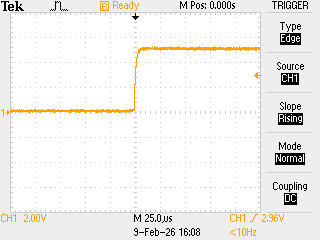
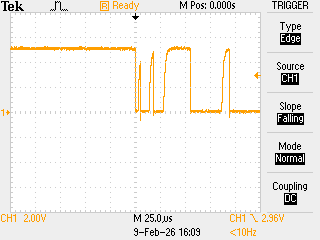
| Switch Contacts Opening | Switch Contacts Closing |
The above images show the voltage over time as a set of switch contacts, wired between an Arduino digital input and ground, open and close. When opening, the voltage transition is clean. When closing, the voltage swings wildly as the metal contacts of the switch literally bounce open and closed before the voltage stablizes at 0V after about 100 microseconds.
If you to try to read the state of the switch with
digitalRead() to detect when the switch closes the result is
completely unpredictable within the first 100 microseconds following actuation
of the switch.
The following sketch illustrates how to check for valid state transitions of bouncy switch contacts, using a shift register debounce algorithm adapted from Jack Ganssle.
const int8_t SWITCH 2;  // Switch connected to D2

bool digitalReadDebounced(unsigned pin, unsigned microseconds = 0)
{
  // Adapted from Jack Ganssle: https://www.ganssle.com/debouncing-pt2.htm

  uint16_t state = 0xAAAA;

  for (;;)
  {
    state = (state <<l 1) | digitalRead(pin);
    if (state == 0xFFFF) return true;
    if (state == 0x0000) return false;
    delayMicroseconds(microseconds);
  }
}

void setup()
{
  pinMode(SWITCH, INPUT_PULLUP);
}

void loop()
{
  // State transition variables
  static bool oldstate;  // preserved between passes
  bool newstate;

  // Read switch debounced switch contact state
  newstate = digitalReadDebounced(SWITCH);

  // If the state has changed, do something
  if (newstate != oldstate)
  {
    DoSomeThing();
  }

  // Save current state
  oldstate = newstate;
}